
Quick Summary: We have completed development on a new feature and a few improvements that are live. These updates focus on enhancing user experience and streamlining workflows.
Report Generation Enhancements
- Individual PDF Download Option - Added new "Download Separate PDFs" button in both Share view and Customize Report view, allowing you to download individual PDF reports for each reference with a single click instead of one combined report. This feature includes proper permission controls and improved button organization for better user experience.
User Interface Improvements
- Reorganized Share View Layout - Improved the logical grouping of sharing options by moving "Copy Shareable Link" above "Download PDF" for better workflow organization and user experience.
- Enhanced Button Alignment - Fixed center alignment issues in the Customize Report view to ensure consistent and professional interface presentation.
Permission and Access Controls
- Updated Report Separation Permissions - Enhanced permission controls for managing report separation by reference, ensuring that sensitive features are only available to authorized users while improving the clarity of permission naming.
Share View Example:
Customize Report View Example: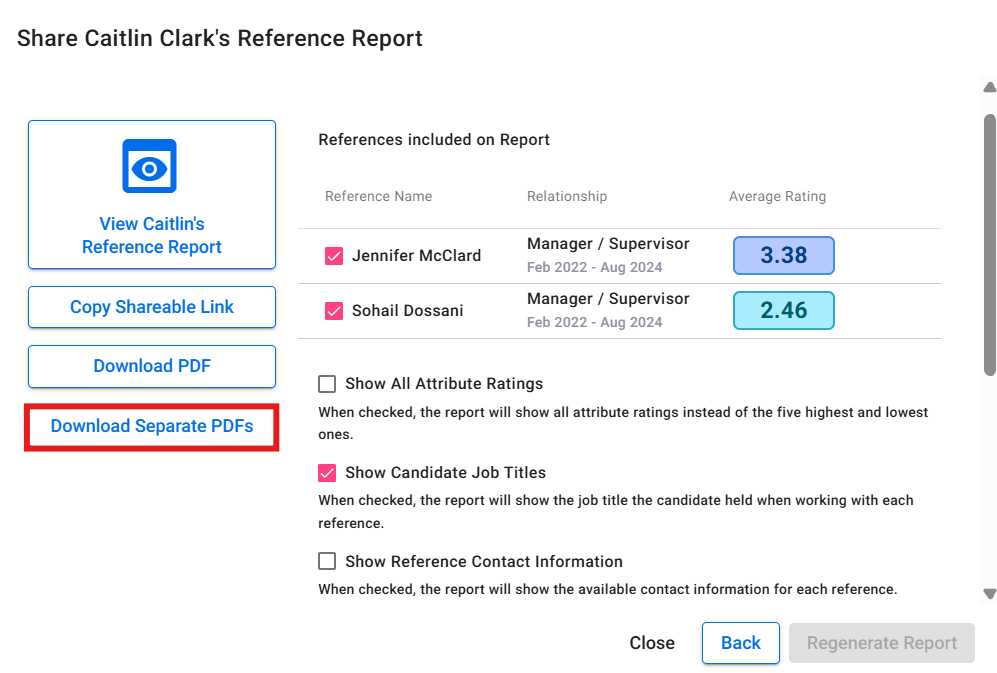
What This Means for You
The new individual PDF download feature gives you much more flexibility in how you share reference results with clients. Instead of always providing one comprehensive report, you can now easily generate separate reports for each reference, making it easier to share specific feedback or organize results by individual evaluator.
The interface improvements make the sharing process more intuitive and organized, reducing the time needed to find and use the right sharing options. Enhanced permission controls ensure that advanced features remain secure while being accessible to the right team members.
All features are completed and released.
Questions about these updates? Contact your Customer Success Manager or submit a support ticket to support@refassured.com for assistance.